


Most of the popular free QR code generator websites — you know the ones, plastered with ads and bold "FREE!" banners — pull a clever little trick that most people never realise.
When you type in your website address and hit generate, you might expect the QR code to link directly to your site. But what many of these services actually do is something quite different:
🔄 How the redirect trick works
They create a QR code that points to THEIR server first. When someone scans the code, they are silently bounced through that company's website before landing on your actual destination. You end up being a passenger on their redirect bus — and they're the ones driving.
Why do they do this? A few reasons:
If their company closes down, changes its pricing, or you stop paying — your QR code stops working. Thousands of printed flyers, business cards, and signs become instant paperweights.
We want to share something that has made our lives much easier — and costs absolutely nothing. We're not sponsored, we don't get a referral fee, and we have no commercial relationship with this service whatsoever. We simply think it's great, and we want more people to know about it.
⭐ Our recommendation: QRCode Monkey
Visit qrcode-monkey.com — a completely free QR code generator that builds your code to link DIRECTLY to your URL. No redirects. No monthly fees. No account required. No watermarks. Just a clean, working QR code that belongs to you.
Here's what makes QRCode Monkey different, and why we've made it our go-to tool:
QRCode Monkey supports a wide range of QR code types — far beyond just website links:
Whatever you need people to do when they scan your code, there's a QR type for it.
One of the most enjoyable parts of using QRCode Monkey is the ability to make your QR code look genuinely good. Gone are the days of boring black-and-white grids. Here's what you can customise:
You can set the foreground colour (the dots and shapes that make up the code) and the background colour independently. Want a deep navy code on a soft cream background? A teal code on white to match your brand? Go for it.
The individual dots that form the QR pattern don't have to be squares. Choose from circles, rounded squares, diamonds, and more. Each gives the code a distinct personality.
The three square "eyes" in the corners of every QR code can also be customised — both their outer frame shape and the inner dot. Mix and match to create something that feels truly unique.
All four QR codes below link directly to https://pebbleit.au — each with a completely different look and feel:
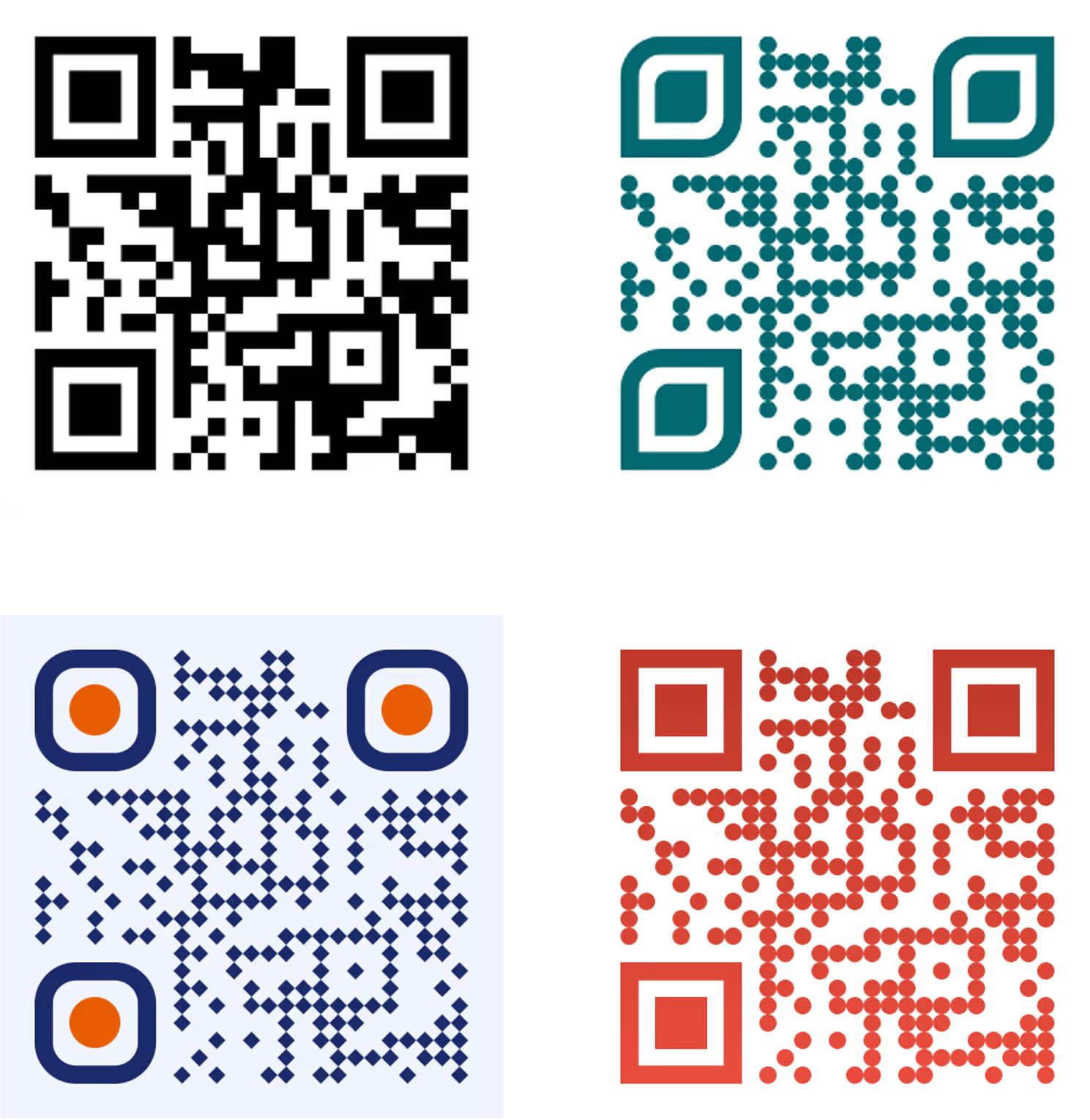
Each of these was created in minutes, downloaded as a PNG, and is ready to use anywhere — print, digital, social media, wherever.
Still not sure? Here's a quick side-by-side comparison of the typical "free" redirect services versus QRCode Monkey:
One area where paid redirect services genuinely do have an edge is scan tracking — they can tell you how many times a code was scanned, and sometimes where. It's a useful feature. But here's the good news: you don't need to pay for it.
If you care about tracking how your QR codes perform, the answer is UTM parameters — a free, open standard that works with virtually every analytics platform on the planet, including Google Analytics, Adobe Analytics, HubSpot, Matomo, Plausible, and many more.
UTM stands for Urchin Tracking Module — named after a web analytics company that Google acquired back in 2005. The name is a bit obscure, but the concept is wonderfully simple: you attach extra information to the end of your URL, and when someone visits that link, your analytics platform reads those tags and logs where the visitor came from.
They look like this, added to the end of any URL after a question mark:
📌 Basic structure
https://yourwebsite.com?utm_source=SOURCE&utm_medium=MEDIUM&utm_campaign=CAMPAIGN
Each tag is a name=value pair. Multiple tags are joined with the & symbol. The URL still works perfectly without them — they're invisible to the visitor but highly informative to your analytics tool.
The first three — source, medium, and campaign — are considered the standard set. Most analytics platforms expect at least these three to properly categorise your traffic. The other two are optional extras for more detailed reporting.
Because UTM parameters are an open standard rather than a proprietary format, they are supported by almost every analytics platform in common use today:
If your website has any analytics tool installed — and most do — there is an excellent chance it already understands UTM parameters. You simply need to start using them.
There are also free tools that make building UTM URLs easy, such as Google's own Campaign URL Builder. You simply fill in the fields, copy the generated URL, and paste it into QRCode Monkey as your destination. Done — you now have a beautifully designed, trackable QR code that costs you absolutely nothing.
At Pebble IT, we genuinely enjoy finding tools that work well and sharing them with the people around us. QRCode Monkey is one of those tools. It does exactly what it promises, it's completely free, and it produces results you'll be proud to put on anything.
We receive absolutely no financial benefit from recommending it. No affiliate commission, no sponsorship, no referral deal. We just think it's excellent, and we believe good things are worth sharing.
So go ahead — create a beautiful QR code, add some UTM parameters, and enjoy knowing exactly how well it's working for you.
QRCode Monkey — https://www.qrcode-monkey.com/
Google's Campaign URL Builder — https://ga-dev-tools.google/campaign-url-builder/